To start an online store in Nepal, register a firm or company and get a PAN, then list your store on the government e-commerce portal as the Electronic Commerce Act, 2081 requires. Open eSewa, Khalti and Fonepay merchant accounts, agree cash on delivery with a courier, and build fast product pages. With me, a store starts from NPR 60,000.
I am Ujjwal Rupakheti, a full-stack web developer in Itahari. Many Nepali shops start by selling through Facebook and Instagram messages. It works until orders get lost in chats, payments arrive as screenshots, and nobody knows which products actually sell. This guide is the plan I would follow to move a shop like that onto its own store.
The legal side comes first, because since 2025 it is no longer optional. Every legal and payment detail below comes from the Act itself or from official eSewa, Khalti and Fonepay pages.
What Do You Need to Start an Online Store in Nepal?
You need eight things, roughly in this order: a registered business, a PAN, an e-commerce listing, payment accounts, a delivery partner, a platform, product pages and a launch check. The order matters, because payment providers ask for your registration documents, and the Act asks for your listing number on the site.
- Register the business as a private firm or a private limited company, and get a PAN from the Inland Revenue Department.
- Decide what you sell, to whom, and whether any product needs a separate licence.
- Choose the platform: a custom build, WooCommerce or Shopify.
- Apply for eSewa, Khalti and Fonepay merchant accounts with your documents.
- Agree cash on delivery with a courier such as Pathao or Nepal Can Move.
- Build product pages with clear prices, delivery charges, return terms and structured data.
- Apply to be listed on the Department’s e-commerce portal, and show the listing number on the site.
- Test every payment and delivery path, then launch and watch the first orders closely.
Steps 3 to 6 can run in parallel. Merchant approvals take days or weeks, so apply as soon as your papers are ready.
How Do You Register an Online Business in Nepal?
Register the business first, because everything else depends on it. A small seller with one owner can start as a private firm (a sole proprietorship). Founders who plan to raise money, add partners or sign larger contracts usually register a private limited company with the Office of the Company Registrar, which runs its system online at ocr.gov.np.
| Private firm | Private limited company | |
|---|---|---|
| Who it suits | One owner selling a small or medium range | Founders with partners, investors or bigger plans |
| Where you register | The government office that serves your area | Office of the Company Registrar |
| Owner’s liability | Personal | Limited to the company |
| Papers payment providers ask for | Firm registration, PAN, citizenship, tax clearance | Incorporation, PAN, MOA/AOA, board minute, tax clearance |
After registration, get a PAN from the Inland Revenue Department. A PAN is the minimum: the Act asks you to show your VAT registration number or your PAN on the site. VAT registration becomes compulsory above a turnover threshold set by each year’s Finance Act, so check the current figure with IRD or your accountant before you price your products.
If you sell food, medicine, cosmetics or anything else that needs its own permission, get that licence before you list it. Section 13 of the Act says goods that need a separate licence cannot be sold online without it.
What Does Nepal’s E-Commerce Act Require from Your Store?
Nepal’s Electronic Commerce Act, 2081 (2025) received assent on 16 March 2025 and came into force on its 31st day. It says every business selling online must run its own electronic platform, show its business details on it, and be listed on the e-commerce portal of the Department of Commerce, Supplies and Consumer Protection.
There is one exception that matters to small sellers. Section 4 says micro entrepreneurs and similar small-scale sellers can still sell through other platforms, such as a marketplace, instead of building their own. Once you have your own store, the full rules apply. The official English text is on the Nepal Law Commission website; the points below are my plain summary, not legal advice.
Getting Listed
After the platform is live, you apply online to be listed, with your business name, registration number, owner or director details, a description of the business, your PAN or VAT number, and contact details. The Department must send your listing number within seven days of receiving the application. In August 2026 the Kathmandu Post reported, citing the Department, that 1,530 businesses had applied and 345 had been approved, so apply early and keep the papers complete.
What the Store Must Show
- The platform name, business name, address, registering office and registration number.
- Your VAT registration number or PAN, and any special licence you hold.
- Whether you sell your own listed goods or act as a marketplace for other sellers.
- Customer service email, phone and mobile, and a named contact for complaints.
- Your listing number from the e-commerce portal, updated within 48 hours of any change.
Section 6 sets what each product page must say, covered below. Other rules shape daily running:
- Returns: if a product does not match its description, the buyer can return it unused, and you must accept it and offer an exchange or a refund including tax.
- Complaints: you need an online way to receive complaints, and you must decide on each one within 15 days.
- Reviews: posting fake reviews or ratings, by you or anyone pretending to be a customer, is an offence.
- Privacy: customer details must stay confidential and cannot be used beyond what the law allows.
The fines are realSelling without a platform, without a listing or without the product details can bring a fine of NPR 20,000 to NPR 1,00,000. Fake reviews, misleading adverts and refusing lawful returns can bring NPR 50,000 to NPR 5,00,000, up to three years in prison, or both.
How Do You Get eSewa, Khalti and Fonepay Merchant Accounts?
Each provider has its own sign-up and documents, and none is instant. eSewa and Khalti take online applications; Fonepay works through banks. Apply to all three in the same week, and build and test while they review your papers.
| Provider | Where to apply | Typical documents | How money reaches you |
|---|---|---|---|
| eSewa | Online at merchant.esewa.com.np, or at eSewa’s head office | Registration certificate, PAN or VAT, citizenship, latest tax clearance; companies add MOA/AOA and a board minute | Into your eSewa merchant account, which you withdraw to your bank free of cost |
| Khalti | Online at khalti.com/merchant, then business KYC | Company registration, PAN or VAT, latest tax clearance and your logo | Into your Khalti merchant account, then to one bank account at no charge, after a signed agreement |
| Fonepay | Through a Fonepay partner bank where you hold a business account | Your registered business and bank account, plus the bank’s own forms | Through your partner bank account, on the bank’s terms |
Requirements change. Check the current lists on eSewa’s merchant documents page and Khalti’s payment gateway page before you apply.
Three details catch new stores out. First, eSewa’s list depends on your business type, and a sole proprietor with under NPR 1 lakh a year in transactions has a shorter list. Second, Khalti’s documentation says a newly integrated merchant cannot receive more than NPR 200 per transaction until its KYC is approved and the limit is removed. Third, Khalti says it charges a one-time API fee and a fee per transaction, agreed with its merchant staff.
The integration itself is developer work: signed forms for eSewa, a server-side request and lookup for Khalti, and a bank’s specification for Fonepay dynamic QR. I explain every field and check in my eSewa and Khalti payment integration guide. If you already have a site and only need the payments, that is my payment gateway integration service.
Custom Store, WooCommerce or Shopify: Which Should You Use?
Choose WooCommerce for a small or medium catalogue where you want official eSewa and Khalti plugins and low running costs. Choose a custom build when checkout, delivery rules or stock need to work your way. Shopify is quick to start, but its own payment system does not work for Nepali businesses.
| Custom build | WooCommerce | Shopify | |
|---|---|---|---|
| eSewa and Khalti | Built directly on their APIs | Official plugins from both | Third-party apps only; no official plugin listed by either |
| Cards for buyers abroad | Through a provider your bank supports | Through a provider your bank supports | Shopify Payments is not available in Nepal |
| Running costs | Hosting and upkeep | Hosting, theme and paid plugins | Monthly plan in USD, plus app fees |
| Best for | Unusual checkout, stock or delivery rules | Most small and medium stores | Simple catalogues that start with COD |
The payment row decides most cases. eSewa’s developer docs list official plugins for WooCommerce, PrestaShop and Magento, and Khalti’s list WooCommerce and WHMCS. Shopify lists its own payment system only in about forty countries, and Nepal is not one of them. Stripe’s country list does not include Nepal either. On Shopify, you would rely on third-party payment apps, or on manual methods such as cash on delivery and bank transfer.
Not every business needs a cart. Export goods made to size, such as handmade rugs, suit a catalogue with enquiry forms, like the Pentagon Carpets catalogue website, where each carpet has photos, specifications and an enquiry button instead of a price.
If you plan to sell abroad in foreign currency, read Sections 8 and 11 of the Act and talk to your bank first. Foreign-currency sales follow the federal foreign exchange rules, and exports must be paid through the banking system.
How Do Cash on Delivery and Delivery Partners Work in Nepal?
Cash on delivery is still how many Nepali buyers prefer to pay, and the Act allows it. Section 8 says a payment made to your delivery partner on your behalf counts as payment received by you. You must still give the buyer an invoice and a payment receipt, and keep a record.
Beyond your own city, you need a courier that collects cash and settles it to you. Two that offer this are Pathao, whose merchants book parcels through the Pathao Merchant app, and Nepal Can Move, which says it has more than 650 branches and offers COD with APIs for online stores. Get each one’s rates, settlement schedule and return charges in writing.
- Confirm large COD orders by phone or WhatsApp before you dispatch them.
- Show delivery charges by area at checkout, as Section 6 of the Act requires.
- Offer a small discount for paying by eSewa, Khalti or Fonepay, so fewer orders depend on cash.
- Record each COD order’s status from the courier, so cash collected matches orders delivered.
The Act puts delivery responsibility on you, not the courier. Section 18 says that when you promise delivery to a place and time, the liability is yours, even if a delivery company carries the parcel. Promise realistic delivery times, especially outside the Kathmandu Valley.
How Do You Build Product Pages That Rank in Google?
A product page that ranks answers the buyer’s questions in plain text, loads fast on a mid-range phone, and describes the product in structured data. In Nepal it must also carry the details Section 6 of the Act requires, which happen to be the same details buyers want before paying.
- A unique name and description, written for the product, not copied from the supplier.
- The final price including tax, and delivery charges stated before checkout.
- Delivery time, payment methods, warranty, and whether the product can be returned and how.
- The maker, the country of origin for imported goods, and expiry dates where they apply.
- Real photos with set width and height, compressed to WebP, and descriptive alt text.
- Nepali text as Unicode, not inside images, if you sell in Nepali.
Add Product structured data to every product page. Google’s merchant listing documentation requires a name, an image and an offer with a price above zero and a currency. It recommends availability, a return policy, shipping details, a brand and an SKU. Here is a simple example with placeholder values:
<script type="application/ld+json">
{
  "@context": "https://schema.org",
  "@type": "Product",
  "name": "Handmade Dhaka Topi, Red",
  "image": ["https://shop.example.com.np/img/dhaka-topi-red.webp"],
  "description": "Hand-woven dhaka topi from Palpa, one size.",
  "sku": "TOPI-RED-01",
  "brand": { "@type": "Brand", "name": "Example Pasal" },
  "offers": {
    "@type": "Offer",
    "url": "https://shop.example.com.np/products/dhaka-topi-red/",
    "price": "1250.00",
    "priceCurrency": "NPR",
    "availability": "https://schema.org/InStock",
    "itemCondition": "https://schema.org/NewCondition"
  }
}
</script>
Generate this from the same data that prints the price on the page, so the two can never disagree. On Nimtto, my wedding invitation product, every design has its own indexable page with Product, Offer and breadcrumb data, built this way. For filters, duplicate URLs and speed on large catalogues, use my technical SEO checklist.
How Much Does an E-Commerce Website Cost in Nepal?
An e-commerce website in Nepal usually costs from about NPR 35,000 for a small template store to NPR 5,00,000 or more for a custom build with integrations. The ranges below come from packages Nepali web agencies advertise in 2026. They are approximate, not a formal survey, and what each price includes varies a lot.
| Type of store | Typical market range (NPR) | With me (NPR) |
|---|---|---|
| Small template store, few products | 35,000 to 90,000 | From 60,000, with payments included |
| Store with eSewa, Khalti, Fonepay and COD | 60,000 to 2,50,000 | From 60,000 |
| Custom store with stock, ERP or app links | 1,50,000 to 5,00,000+ | Quoted after a short call |
| Adding one payment gateway to an existing site | 15,000 to 40,000 per gateway | Quoted per integration |
| Selling on a marketplace only | No build cost; fees per order | Not needed |
Prices exclude hosting, paid themes and plugins, provider fees from eSewa, Khalti, Fonepay or banks, and courier charges. A .np domain is free for a registered business through register.com.np.
NPR60,000
From NPR 60,000, in 3 to 8 weeks: eSewa, Khalti and Fonepay QR, cash on delivery, product structured data, and every payment confirmed on the server. See my e-commerce website development in Nepal.
Per integration
Quoted after I see your code, because the effort depends on the system more than on eSewa or Khalti. Details on my API and payment integration page.
The price grows with the number of products, payment methods and delivery rules. Domain and hosting are always extra and stay in your name. For every other kind of site, see my website cost guide for Nepal; all my prices are on the services and pricing page.
Planning a Store? Get a Fixed Quote.Tell me what you sell, roughly how many products, and how you deliver. Online stores start from NPR 60,000 and take 3 to 8 weeks.
Ask for a quoteCase Note: How Sajilai Takes QR Payments
Not every business can wait for gateway approval before it takes money. Sajilai, the car and bike rental marketplace I built in October 2026, starts with QR payments that work with any bank app or wallet, and records each one against its booking.
A rental business uploads its Fonepay or NepalQR code once, and the browser decodes it. For each booking, Sajilai writes a new QR payload with the amount and the booking code inside, and recomputes the checksum, so the renter never types the amount. Personal eSewa and Khalti codes cannot carry an amount, so the amount is shown beside them instead.
The renter uploads a screenshot, and the payment counts only after the business approves it and a PDF receipt is issued. Next on Sajilai’s list is automatic confirmation through the eSewa and Khalti merchant APIs, which a store with steady volume should have from day one.
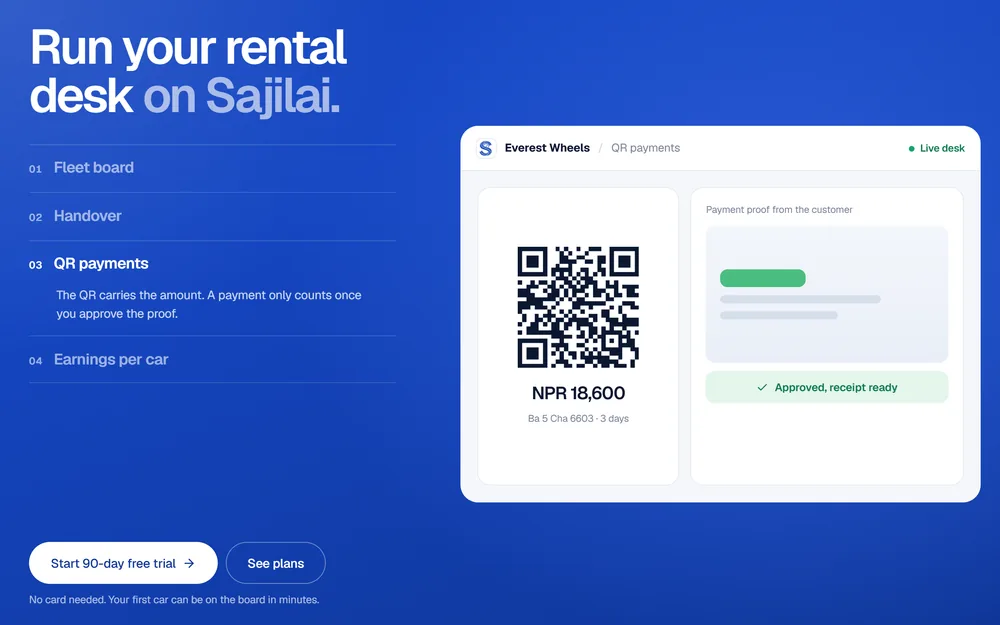
Case study: SajilaiA car and bike rental marketplace for Nepal, with a payment QR that carries the amount and booking code, and receipts for every payment.
Online Store Launch Checklist for Nepal
Run this list in the last week before launch. The problems that hurt a new store most are rarely design problems. They are a payment that marks an order paid without checking, a missing return policy, or a product page Google cannot read.
- Business registration, PAN and any product licences in hand.
- Listing application sent, and the listing number shown on the site once received.
- Business name, address, PAN or VAT, and complaint contact in the footer or an about page.
- Live keys for eSewa, Khalti and Fonepay, with test keys removed from the server.
- A real payment of each type made, refunded and checked against the merchant dashboard.
- Orders marked paid only after the server checks the payment with the provider.
- COD rates, areas and settlement schedule agreed with the courier in writing.
- Return, refund, cancellation and delivery policies published and linked from checkout.
- Invoice and receipt sent automatically for every paid order.
- Product structured data tested in Google’s Rich Results Test, and the sitemap submitted in Search Console.
- Checkout tested on a mid-range Android phone over mobile data.
After launch, compare every payment in your database with the provider’s dashboard each day until the numbers match without effort. My SEO cost guide explains what it takes to keep product pages ranking. Whether your shop is in Itahari, where I am based, or in Kathmandu, I run this checklist on every store I build before it goes live. To have it run by the developer who builds the store, see my page as a web developer in Nepal.

About the author
Ujjwal Rupakheti
I am a full-stack web developer and SEO specialist based in Itahari, Koshi Province, Nepal. I have worked in web development and SEO since 2022 and have published more than 200 SEO-optimised articles across five-plus domains. Since June 2026 I have been a full-stack web developer at Ektukra Digital Agency, after a year there on SEO content strategy and QA testing.