eSewa and Khalti payment integration follows one pattern: your server creates the payment, the customer pays on the provider’s page, and your server confirms it before marking the order paid. eSewa ePay v2 uses an HMAC-SHA256 signed form and a status check API. Khalti KPG-2 uses a server-side initiate call, a pidx and a lookup.
I am Ujjwal Rupakheti, a full-stack developer in Itahari. Payment bugs cost real money: an order marked paid that never was, or a customer charged twice. This guide shows how I approach eSewa, Khalti and Fonepay, with short Node.js and TypeScript examples.
Every endpoint, field and status below comes from the current official documentation: eSewa’s ePay docs, Khalti’s KPG-2 docs and Fonepay’s own pages. Check them again before you ship.
How Do eSewa, Khalti and Fonepay Payments Work?
eSewa and Khalti both redirect and confirm. The customer leaves your site to pay, returns to a URL you chose, and your server asks the provider whether the payment really happened. With Fonepay dynamic QR, the customer scans a code with a bank or wallet app, and confirmation comes through the system your bank provides.
- The customer clicks Pay. Your server creates the order and a payment attempt, with the amount stored in paisa.
- The server signs the eSewa form, or calls Khalti’s initiate endpoint.
- The customer pays on eSewa’s or Khalti’s page.
- The provider sends the customer back to your success or return URL.
- Your server calls the provider’s status or lookup API and compares the amount.
- The attempt is marked paid exactly once, and the receipt goes out.
eSewa now also documents an Intent payment, marked as recommended in its docs, which books a payment by API and opens the eSewa app through a deeplink. This guide covers ePay v2, the web form flow most websites use.
What Do You Need Before You Integrate eSewa or Khalti?
You need a merchant account with each provider, its keys, and a server you control. eSewa and Khalti both offer a test environment, and both need your business documents before live payments. Fonepay needs a partner bank agreement before you see any technical details.
- eSewa: a merchant account from merchant.esewa.com.np. eSewa provides your
product_code(the merchant code) and a secret key. For testing, the docs publish a test product code,EPAYTEST, and the test credentials listed in eSewa’s documentation. - Khalti: a sandbox merchant account from test-admin.khalti.com for testing, and a live one from admin.khalti.com. The server uses the key Khalti labels
live_secret_keyin both dashboards. - Fonepay: a business account at a Fonepay partner bank, with the dynamic QR feature requested through that bank.
- A server: secret keys live in environment variables on the server only. Khalti’s FAQ says never to share the secret key, and to regenerate it from the dashboard if it leaks.
- HTTPS return URLs: Khalti says the
return_urlmust accept GET requests, and eSewa needs both asuccess_urland afailure_url.
If you are planning the store around these payments, my guide on how to start an online store in Nepal covers merchant documents, the E-Commerce Act and cash on delivery.
How Does eSewa ePay V2 Integration Work?
eSewa ePay v2 works by posting a signed HTML form to eSewa. Your server fills the fields, signs three of them with HMAC-SHA256, and the browser submits the form. The customer signs in to eSewa and confirms, and eSewa sends them back to your success or failure URL with a Base64-encoded response.
The browser POSTs the form to one of two addresses:
# Testing (UAT)
POST https://rc-epay.esewa.com.np/api/epay/main/v2/form

# Production
POST https://epay.esewa.com.np/api/epay/main/v2/form
The ePay V2 Form Fields
| Field | What it holds |
|---|---|
amount | The product amount |
tax_amount | Tax on the product; 0 if not used |
product_service_charge | Your service charge; 0 if not used |
product_delivery_charge | Your delivery charge; 0 if not used |
total_amount | The sum of the four fields above |
transaction_uuid | Your unique ID for this request; letters, digits and hyphens only |
product_code | Your merchant code from eSewa |
success_url, failure_url | Where eSewa sends the customer after success, or after failure or pending |
signed_field_names | total_amount,transaction_uuid,product_code |
signature | The HMAC-SHA256 signature, Base64-encoded |
Every field is required and none can be empty. You can also send up to three optional fields named properties[your_field_name].
Signing the Request with HMAC-SHA256
Build a message from the signed fields as name=value pairs, joined by commas, in exactly the order signed_field_names lists them. For a total of 110 it looks like total_amount=110,transaction_uuid=ord-1042-1,product_code=EPAYTEST. Sign it with HMAC-SHA256 using your secret key, and Base64-encode the result.
import crypto from "node:crypto";

const FORM_URL = process.env.ESEWA_FORM_URL!;     // the rc-epay URL while testing
const PRODUCT_CODE = process.env.ESEWA_PRODUCT_CODE!;
const SECRET = process.env.ESEWA_SECRET_KEY!;     // server only, never in the browser

// "name=value" pairs, in the order signed_field_names lists them
export function esewaSign(data: Record<string, unknown>, names: string): string {
  const message = names.split(",").map((n) => `${n}=${data[n]}`).join(",");
  return crypto.createHmac("sha256", SECRET).update(message).digest("base64");
}

// Integer paisa to a rupee string: 125000 becomes "1250"
export const rupees = (paisa: number) =>
  paisa % 100 === 0 ? String(paisa / 100) : (paisa / 100).toFixed(2);

export function esewaForm(attempt: { uuid: string; amountPaisa: number }) {
  const total = rupees(attempt.amountPaisa);
  const fields: Record<string, string> = {
    amount: total,
    tax_amount: "0",
    product_service_charge: "0",
    product_delivery_charge: "0",
    total_amount: total,
    transaction_uuid: attempt.uuid,       // new for every attempt
    product_code: PRODUCT_CODE,
    success_url: "https://shop.example.com.np/pay/esewa/success",
    failure_url: "https://shop.example.com.np/pay/esewa/failure",
    signed_field_names: "total_amount,transaction_uuid,product_code",
  };
  fields.signature = esewaSign(fields, fields.signed_field_names);
  return { action: FORM_URL, fields };    // render as hidden inputs, POST to action
}
If you charge VAT separately, put it in tax_amount and make total_amount the sum. The value you sign must be the exact string you send, so build both from the same variable.
Success and Failure URLs
eSewa sends the customer to success_url after a successful payment, and to failure_url after a failed or pending one, including when the customer cancels. eSewa’s FAQ says a payment must be made within 15 minutes of signing in, or it fails and must be started again.
Decoding and Verifying the eSewa Response
On success, eSewa adds the response to your success URL as Base64. Decoded, it holds transaction_code, status, total_amount, transaction_uuid, product_code, signed_field_names and signature. eSewa’s docs tell you to recompute the signature the same way as the request and compare it with the one they sent.
Two details trip people up. The response’s signed_field_names lists more fields than your request did, and includes itself. And total_amount can arrive formatted, such as "1,000.0", so sign the values exactly as received. The docs only say the response is Base64-encoded; community integrations read it from a data query parameter, so log the raw URL on your first test payment and confirm.
app.get("/pay/esewa/success", async (req, res) => {
  const raw = String(req.query.data ?? "");   // confirm the name on your first test
  let body: Record<string, string>;
  try {
    body = JSON.parse(Buffer.from(raw, "base64").toString("utf8"));
  } catch {
    return res.redirect("/checkout?payment=failed");
  }

  // Recompute over the fields eSewa says it signed, values as received
  const expected = Buffer.from(esewaSign(body, body.signed_field_names ?? ""));
  const given = Buffer.from(String(body.signature ?? ""));
  if (expected.length !== given.length || !crypto.timingSafeEqual(expected, given)) {
    await logEvent("esewa", "bad_signature", body);
    return res.redirect("/checkout?payment=failed");
  }

  // A valid signature is still not the final word: ask eSewa
  const attempt = await findAttempt("esewa", body.transaction_uuid);
  if (!attempt) return res.status(404).send("Unknown payment");
  const check = await esewaStatus(attempt);
  await logEvent("esewa", "status", check);
  if (check.status === "COMPLETE" && toPaisa(check.total_amount) === attempt.amountPaisa) {
    await markPaid(attempt.id, check.ref_id);  // runs once, see the SQL below
    return res.redirect(`/orders/${attempt.orderId}?paid=1`);
  }
  return res.redirect(`/orders/${attempt.orderId}?payment=pending`);
});
The eSewa Status Check API
The status check API tells you what eSewa recorded for a transaction. Send a GET request with product_code, total_amount and transaction_uuid as query parameters; the test and production addresses are in the code below. eSewa’s docs say to use it when no response arrives within five minutes; calling it on every success as well is the safer habit.
// Testing:    https://rc.esewa.com.np/api/epay/transaction/status/
// Production: https://esewa.com.np/api/epay/transaction/status/
const STATUS_URL = process.env.ESEWA_STATUS_URL!;

export async function esewaStatus(a: { uuid: string; amountPaisa: number }) {
  const url = new URL(STATUS_URL);
  url.searchParams.set("product_code", PRODUCT_CODE);
  url.searchParams.set("total_amount", rupees(a.amountPaisa));  // the value you signed
  url.searchParams.set("transaction_uuid", a.uuid);
  const r = await fetch(url, { signal: AbortSignal.timeout(10_000) });
  return (await r.json()) as { status: string; total_amount: number; ref_id: string | null };
}

// Rupees, possibly "1,000.0", to integer paisa
export const toPaisa = (v: string | number) =>
Math.round(Number(String(v).replace(/,/g, "")) * 100);| Status | eSewa’s meaning | What to do |
|---|---|---|
COMPLETE | Successful payment | Mark paid if the amount matches |
PENDING | Initiated, not completed yet | Keep pending, check again later |
AMBIGUOUS | Payment in a halted state | Hold the order and contact eSewa |
NOT_FOUND | Session expired at eSewa | Mark failed, let the customer retry |
CANCELED | Cancelled or reversed by eSewa | Mark failed |
FULL_REFUND, PARTIAL_REFUND | Refunded to the customer | Record the refund against the order |
If eSewa’s server times out, the API answers with "Service is currently unavailable". Treat that as unknown, not failed, and try again later.
How Does Khalti KPG-2 Integration Work?
Khalti KPG-2 works through two server calls. Your server POSTs the order to the initiate endpoint and gets back a pidx and a payment_url. You send the customer to that URL. When Khalti returns them to your return_url, your server POSTs the pidx to the lookup endpoint and trusts only that answer.
The base URL is https://dev.khalti.com/api/v2/ in the sandbox and https://khalti.com/api/v2/ in production. Every request carries the header Authorization: Key <secret key>, with the word Key first.
Initiating a Khalti Payment
POST JSON to /epayment/initiate/. The required fields are return_url, website_url, amount, purchase_order_id and purchase_order_name. The amount is in paisa, and Khalti rejects anything not above NPR 10, which is 1000 paisa. Optional fields are customer_info, amount_breakdown, whose amounts must add up to amount, and product_details.
const KHALTI = process.env.KHALTI_BASE_URL!;    // https://dev.khalti.com/api/v2 in the sandbox
const headers = {
  Authorization: `Key ${process.env.KHALTI_SECRET_KEY}`,
  "Content-Type": "application/json",
};

export async function khaltiStart(a: { id: string; orderName: string; amountPaisa: number }) {
  const r = await fetch(`${KHALTI}/epayment/initiate/`, {
    method: "POST",
    headers,
    body: JSON.stringify({
      return_url: "https://shop.example.com.np/pay/khalti/return",
      website_url: "https://shop.example.com.np/",
      amount: a.amountPaisa,             // integer paisa: NPR 1,250 is 125000
      purchase_order_id: a.id,           // unique per attempt
      purchase_order_name: a.orderName,
    }),
  });
  const body = await r.json();
  await logEvent("khalti", "initiate", { http: r.status, body });
  if (!r.ok) throw new Error(`Khalti initiate failed (${r.status})`);
  await saveRef(a.id, body.pidx);        // store pidx against the attempt
  return body.payment_url as string;     // redirect the customer here
}
The response also holds expires_at and expires_in. Khalti’s docs say a payment link expires in 60 minutes in production by default.
The Return URL Callback
After payment, Khalti redirects the customer to your return_url with pidx, status, transaction_id, tidx, amount, total_amount, mobile, purchase_order_id and purchase_order_name. A cancelled payment comes back with status=User canceled and an empty transaction ID. Read only the pidx from here. Khalti’s docs say to use the lookup API for the final validation.
Confirming with the Khalti Lookup API
POST {"pidx": "..."} to /epayment/lookup/. The answer holds pidx, total_amount in paisa, status, transaction_id, fee and refunded. Khalti lists HTTP status 400 for Expired and User canceled, so read the body even when the request is not “ok”.
app.get("/pay/khalti/return", async (req, res) => {
  const pidx = String(req.query.pidx ?? "");
  const attempt = await findAttempt("khalti", pidx);
  if (!attempt) return res.status(404).send("Unknown payment");

  const r = await fetch(`${KHALTI}/epayment/lookup/`, {
    method: "POST",
    headers,
    body: JSON.stringify({ pidx }),
  });
  const look = await r.json();           // read it even on a 400
  await logEvent("khalti", "lookup", { http: r.status, look });

  if (look.status === "Completed" && look.total_amount === attempt.amountPaisa) {
    await markPaid(attempt.id, look.transaction_id);
    return res.redirect(`/orders/${attempt.orderId}?paid=1`);
  }
  if (look.status === "Pending") return res.redirect(`/orders/${attempt.orderId}?payment=pending`);
  return res.redirect("/checkout?payment=failed");
});| Status | HTTP code | Khalti’s instruction |
|---|---|---|
Completed | 200 | Provide the service; the only success |
Pending | 200 | Hold, do not provide the service, and contact Khalti |
Initiated | 200 | Not paid yet; hold the order |
Expired | 400 | Not paid; do not provide the service |
User canceled | 400 | Cancelled; do not provide the service |
Refunded, Partially Refunded | 200 | Refunded; do not provide the service |
In Next.js, the same code runs in a route handler on the server, such as app/pay/khalti/return/route.ts. Never call these endpoints from a client component, because the secret key would ship to the browser. The structure is the same one I use for any API development in Nepal: one module per provider, one table of attempts, and logs for every call.
Need eSewa or Khalti on Your Site?I add eSewa, Khalti and Fonepay to new and existing sites, with every payment confirmed on the server and recorded once. Quoted per integration, after I see your code.
Ask for a quoteHow Does Fonepay Dynamic QR Integration Work?
Fonepay dynamic QR integration starts with your bank, not with a developer portal. Fonepay’s own pages say you register the business, open a business account at a Fonepay partner bank, and ask that bank to enable dynamic QR. The technical specification and test access come with that arrangement.
Here is what Fonepay publishes. A dynamic QR is created for each transaction, with the amount and merchant details set for that sale. It expires once the transaction completes or times out. After activation, merchants use it through a software integration or the merchant dashboard, and Fonepay says the merchant gets real-time confirmation. Fees depend on your agreement with the bank.
What Fonepay’s public pages do not include is an API reference: no endpoints, signing method or sandbox. Some community packages online describe endpoints, but I would build only against the specification your bank hands you, because that is the one you will be held to. That is also why this guide has no Fonepay code.
A Fonepay Option Before the Bank Agreement
Until dynamic QR is active, a business can still show its Fonepay merchant QR and confirm payments by hand. Sajilai, the rental marketplace I built, goes one step further: it decodes a business’s Fonepay or NepalQR code, writes a new EMVCo payload with the amount and booking code inside, and recomputes the CRC checksum. A payment counts only after the business approves the renter’s proof.
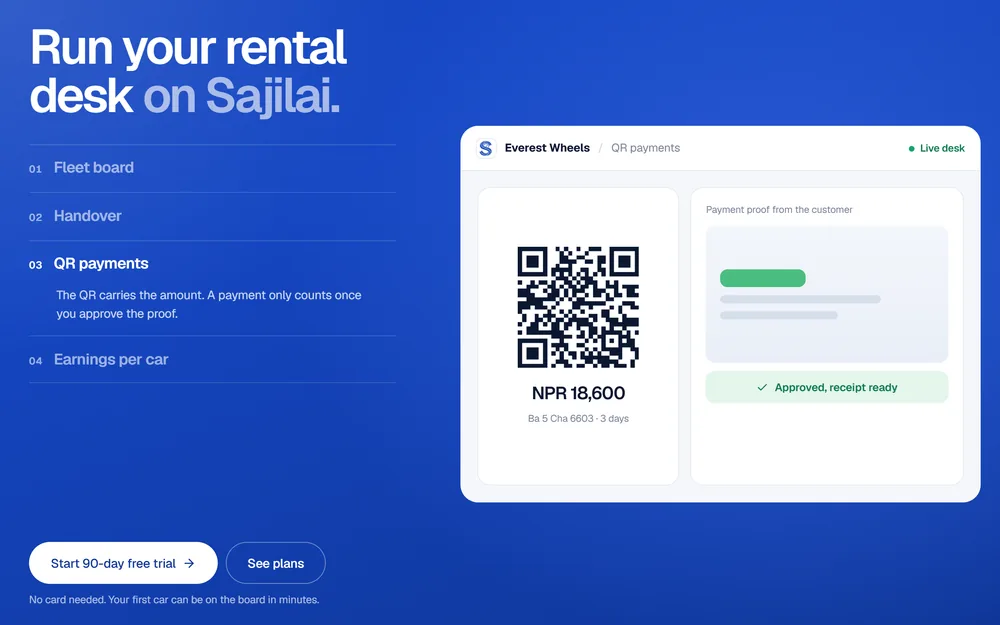
Case study: SajilaiA rental marketplace for Nepal whose payment QR carries the amount and booking code, with each payment approved and receipted.
How Do You Keep eSewa and Khalti Payments Secure?
Treat everything that arrives through the customer’s browser as a claim, not a fact. A success URL can be typed by hand, and a refresh or retry can arrive twice. Payments stay safe when the server confirms each one with the provider, stores money as whole numbers and records it exactly once.
- Verify on the server, never by the redirect: ignore
statusandamountin the query string, and mark an order paid only after eSewa’s status check or Khalti’s lookup saysCOMPLETEorCompleted. - Compare the amount: the provider’s amount, in paisa, must equal the amount on the attempt. eSewa’s FAQ calls a mismatch a possible fraud case and says to stop delivery.
- Make it idempotent: unique keys on the provider’s reference and transaction ID, and an update that only changes an unpaid attempt.
- Store paisa as integers: a
bigintcolumn, converted to rupees only when building eSewa’s form. - Log every attempt: each initiate, redirect, status and lookup call with its response, without secret keys.
- Reconcile: a job that re-checks unfinished attempts, and a daily match against the merchant dashboard.
CREATE TABLE payment_attempts (
  id            bigserial   PRIMARY KEY,
  order_id      bigint      NOT NULL REFERENCES orders (id),
  provider      text        NOT NULL,          -- 'esewa', 'khalti' or 'fonepay'
  provider_ref  text        NOT NULL,          -- transaction_uuid or pidx
  amount_paisa  bigint      NOT NULL CHECK (amount_paisa > 0),
  status        text        NOT NULL DEFAULT 'initiated',
  provider_txn  text,                          -- ref_id or transaction_id once paid
  created_at    timestamptz NOT NULL DEFAULT now(),
  UNIQUE (provider, provider_ref),
  UNIQUE (provider, provider_txn)
);

-- markPaid: only the first call changes a row; a refresh or retry changes nothing
UPDATE payment_attempts
   SET status = 'paid', provider_txn = $2
 WHERE id = $1 AND status <> 'paid'
RETURNING order_id;
If the update returns a row, mark the order paid and queue the receipt in the same database transaction. If it returns nothing, the payment was already recorded, and you simply show the order. The parameters are bound, never pasted into the SQL, and node-postgres returns bigint as a string, so convert it with Number() when you load an attempt. My database design page covers the rest of the schema, such as refunds and settlements.
Both rules come from products I have shipped. HeliGo Nepal keeps its whole ledger in paisa, so commissions and refunds always add up to what the traveller paid. The Eknas public API requires an Idempotency-Key on every bill, so a retried request returns the first result instead of a second record. Apply the same idea to your own “create payment” endpoint, so a double click cannot open two attempts.
Reconciliation in Practice
Customers close tabs, phones lose signal and redirects fail. Run a job every few minutes that finds attempts still initiated after the provider’s window, 15 minutes for an eSewa session or 60 minutes for a Khalti link, and asks the status or lookup API. Then once a day, match your paid attempts against the eSewa and Khalti merchant dashboards, and investigate any difference the same day.
eSewa and Khalti Sandbox vs Production: What Changes?
Going live changes the URLs, keys and merchant code, and on Khalti also the payment methods and amount limits. Keep each value in an environment variable, so going live is a configuration change, not a code change.
| Setting | Test | Production |
|---|---|---|
| eSewa form host | rc-epay.esewa.com.np | epay.esewa.com.np |
| eSewa status check host | rc.esewa.com.np | esewa.com.np |
| eSewa merchant code and key | EPAYTEST and the test key in eSewa’s docs | Your own, provided by eSewa |
| Khalti API base | dev.khalti.com/api/v2/ | khalti.com/api/v2/ |
| Khalti secret key | From test-admin.khalti.com | From admin.khalti.com |
| Khalti payment methods | No e-banking or cards | Enabled after a successful integration |
| Khalti amount limit | Above NPR 10 | NPR 200 per transaction until KYC is approved |
To pay in either sandbox, use the test credentials listed in each provider’s documentation. Before launch, make one real payment of each type with live keys, refund it, and check that the refund appears in your records. Khalti refunds go through the dashboard or its refund API, which needs the transaction_id from the lookup.
What are the Most Common eSewa and Khalti Integration Errors?
Most failed integrations break in the same few places: the wrong key, the amount in the wrong unit, a signature built from slightly different values, or a check done in the browser. The Khalti messages are quoted from its docs. eSewa publishes no list of form errors, so its rows are the causes to check first.
| Error or symptom | Likely cause | Fix |
|---|---|---|
Khalti: "Invalid token." (401) | Wrong key, or a sandbox key on production | Use the key from the matching dashboard |
Khalti: "Authentication credentials were not provided." | Header without the Key prefix | Send Authorization: Key <secret> |
Khalti: "A valid integer is required." | Amount sent as rupees with decimals | Send whole paisa |
Khalti: "Amount should be greater than Rs. 10, that is 1000 paisa." | Amount too small, or rupees sent as paisa | Multiply rupees by 100 |
Khalti: "Amount Breakdown mismatch." | amount_breakdown does not add up | Make the parts total amount |
| Khalti: CORS error in the browser | Calling Khalti from front-end code | Call from your server |
| eSewa: request signature rejected | Fields out of order, a value that differs from the form, or a hex digest | Sign the sent strings, in signed_field_names order, as Base64 |
| eSewa: response signature never matches | total_amount reformatted before signing | Sign the decoded values exactly as received |
| eSewa: payment refused at the start | A reused transaction_uuid, or one with other characters | A new ID per attempt, letters, digits and hyphens only |
Khalti’s gotchas page lists two more for the sandbox: "Fee not found.", solved by setting your fee between NPR 10 and NPR 200, and "Amount must be less than 200.", which means the contract process is not complete yet.
eSewa vs Khalti vs Fonepay: Which Should You Integrate First?
For most Nepali websites, integrate eSewa and Khalti together, because each has public docs, a sandbox and a clear confirmation API. Add Fonepay dynamic QR once your bank has enabled it, so customers can pay from any bank app. Until then, a Fonepay merchant QR with manual confirmation covers the gap.
| eSewa ePay v2 | Khalti KPG-2 | Fonepay dynamic QR | |
|---|---|---|---|
| How the customer pays | Signs in to eSewa on its page | On Khalti’s page: wallet, e-banking, mobile banking or connectIPS | Scans a QR with a bank or wallet app |
| How you start a payment | A signed form, posted by the browser | A server POST to /epayment/initiate/ | As your bank’s specification says |
| Request security | HMAC-SHA256 signature in Base64 | Authorization: Key header | Set by your agreement |
| Amount unit | Rupees | Paisa, as an integer | As specified |
| How you confirm | Status check API (GET) | Lookup API (POST) | Real-time confirmation, as specified |
| Public docs and sandbox | Yes, developer.esewa.com.np | Yes, docs.khalti.com | No; through your bank |
| Where you apply | merchant.esewa.com.np | khalti.com/merchant, then KYC | A Fonepay partner bank |
If you would rather hand the work over, my payment gateway integration service covers all three, quoted per integration, and every price I charge is on my services page. I take on this work for businesses across Nepal, from Biratnagar to Kathmandu, and for companies abroad that need a Nepali payment flow in their product. For payments inside a subscription product, see my SaaS development guide for Nepal.

About the author
Ujjwal Rupakheti
I am a full-stack web developer and SEO specialist based in Itahari, Koshi Province, Nepal. I have worked in web development and SEO since 2022 and have published more than 200 SEO-optimised articles across five-plus domains. Since June 2026 I have been a full-stack web developer at Ektukra Digital Agency, after a year there on SEO content strategy and QA testing.