A website redesign without losing SEO starts before any design work. Record your Search Console and analytics numbers, crawl every URL, and map each old address to its new one. Keep the content that ranks, block staging from Google, launch with one-hop 301 redirects, a new sitemap and correct tags, then watch Search Console for four to eight weeks.
I am Ujjwal Rupakheti, a web developer and SEO specialist in Itahari. A redesign is the most common way I see businesses in Nepal lose rankings overnight. It usually happens on launch day, when a new design goes live with new addresses, missing pages and a staging setting nobody switched off.
This guide is the process I follow, checked against Google Search Central documentation. It works for WordPress, Next.js or plain HTML, and covers what most guides skip: static hosts such as GitHub Pages, where a normal 301 is not available.
Why Do Websites Lose Rankings After a Redesign?
Rankings drop after a redesign when Google can no longer find, match or trust the pages it ranked before. The usual causes are changed URLs without redirects, deleted or shortened content, lost internal links, a noindex tag carried over from staging, and slower pages. Design itself rarely hurts rankings; the changes that come with it do.
Google ranks pages, not websites, and a redesign can break a page’s address, text, links and history in the index all at once. When an old URL returns a 404, links from other sites stop counting. When a detailed page becomes a slider with three lines of text, it no longer answers the question. Every one of these causes can be checked before launch.
Is Your Redesign Also a Site Migration?
A redesign becomes a site migration as soon as URLs, the platform, the domain or the protocol change. A new look on the same URLs carries the lowest risk. New URLs need a full redirect map. A new domain needs redirects plus Google’s Change of Address tool. Know which kind of project you have before you plan it.
| What changes | SEO risk | What you need |
|---|---|---|
| Design only, same URLs and content | Low | Content parity, staging blocked, launch-day checks |
| New platform, same URLs | Low to medium | The above, plus rendering, speed and structured data checks |
| New URL structure | High | A complete URL map and one-hop 301 redirects |
| New domain, such as .com to .com.np | Highest | Redirects for every URL and the Change of Address tool |
| HTTP to HTTPS | Low if done well | Site-wide 301s; Google detects this move itself |
If you can keep your URLs, keep them. It removes the biggest risk in the project, and it is usually possible even on a new platform. When I take on a redesign as a web developer in Nepal, the URL structure is the first thing I protect.
What Should You Benchmark Before a Website Redesign?
Before any change, save a snapshot of how the site performs today: clicks, impressions and top queries from Search Console, landing pages and conversions from analytics, indexed page counts, Core Web Vitals and the pages other sites link to. Without this baseline you cannot tell a normal wobble from a real loss after launch.
Search Console keeps 16 months of performance data, so export it while the old site is still live. These are the exports I save for every redesign:
- Search Console, Performance: pages and queries for the last 3 and 16 months.
- Search Console, Pages: indexed pages, and why the others are not indexed.
- Search Console, Links: the top linked pages, whose URLs must never break.
- Analytics: organic landing pages with their form sends, calls and WhatsApp clicks.
- Speed and rankings: mobile PageSpeed results for top pages, and positions for 20 to 50 keywords that bring enquiries.
After launch, compare the same report over the same number of days. In Nepal, festival months such as Dashain and Tihar can shift search demand, so compare like with like.
How Do You Build a URL Map for a Redesign?
A URL map is a spreadsheet with every old URL in one column and its new URL in the next. Build it from a full crawl, your XML sitemap, Search Console’s page list, analytics landing pages and your top linked pages. Then send each old URL to the closest matching new page, never all of them to the home page.
No single source finds every URL. A crawler finds linked pages; Search Console and analytics find old pages that still get visits or links but are no longer linked. Merge the lists. The free version of Screaming Frog crawls up to 500 URLs, enough for most small business sites; my SEO tools guide lists other free options.
old_url,new_url,action,notes
/about-us.html,/about/,301,Top linked page
/services/web-design,/web-design-nepal/,301,Ranks for "web design itahari"
/blog/2021/03/seo-tips,/blog/seo-tips/,301,Merged into newer post
/gallery.php?id=7,/projects/,301,Old parameter URL
/contact/,/contact/,keep,Same URL
/offer-dashain-2019,,410,Expired offer; no links, no traffic
Follow four rules when you fill in the new column:
- Same URL where possible. If the page still exists, keep its address and mark it “keep”.
- Closest match. A page that moved or merged redirects to the page that answers the same need.
- No mass redirects to the home page. Google warns that sending many old URLs to one irrelevant page confuses users and may be treated as a soft 404.
- Let dead pages go honestly. A page with no traffic, no links and no replacement can return 404 or 410.
Include images, PDFs and other files. Google’s site-move guidance says embedded content must move in the same way as pages.
How Do You Keep Content Parity in the New Design?
Content parity means each page on the new site keeps the text, headings, title, internal links, images and structured data that made the old page rank. A redesign can change how a page looks; it should not quietly remove what it says. Compare the old and new version of every important page before launch.
Cutting text to make a page look clean is the most expensive edit in a redesign. I check the top 20 landing pages from the benchmark against their new versions:
- Title and description: kept, or improved on purpose, not reset to a template default.
- Headings and text: the same topics, at the same depth.
- Internal links and images: menus and in-text links kept, alt text carried over.
- Structured data: Organization, LocalBusiness, Product, Article and breadcrumb markup carried over.
- Mobile version: the same content as desktop, because Google indexes the mobile page.
If the new site is a React or Vue app, the text must be in the HTML the server sends. My technical SEO checklist shows how to test rendering with the URL Inspection tool.
How Should You Block a Staging Site from Google?
Protect a staging site with a password or an IP restriction, and add a noindex rule as a second guard. Do not rely on robots.txt alone. A URL blocked by robots.txt can still appear in Google if another page links to it, and Google can never see a noindex tag on a page it is not allowed to crawl.
Google says robots.txt “is not a mechanism for keeping a web page out of Google”. Google’s advice is a noindex rule or password protection, and its hosting-move guide suggests a testing environment with IP-restricted access.
<!-- In the <head> of every staging page -->
<meta name="robots" content="noindex, nofollow">

# Or as an HTTP header for every file, including PDFs
X-Robots-Tag: noindex
The real danger comes at launch, when staging rules travel to the live site: a Disallow: / line, a noindex in a shared template, or WordPress’s “Discourage search engines” box still ticked. Google’s site-move troubleshooting names this exact mistake. On Sajilai, the rental marketplace I built, one Docker image runs both the live site and a demo copy with sample data, and the demo copy is set to noindex.
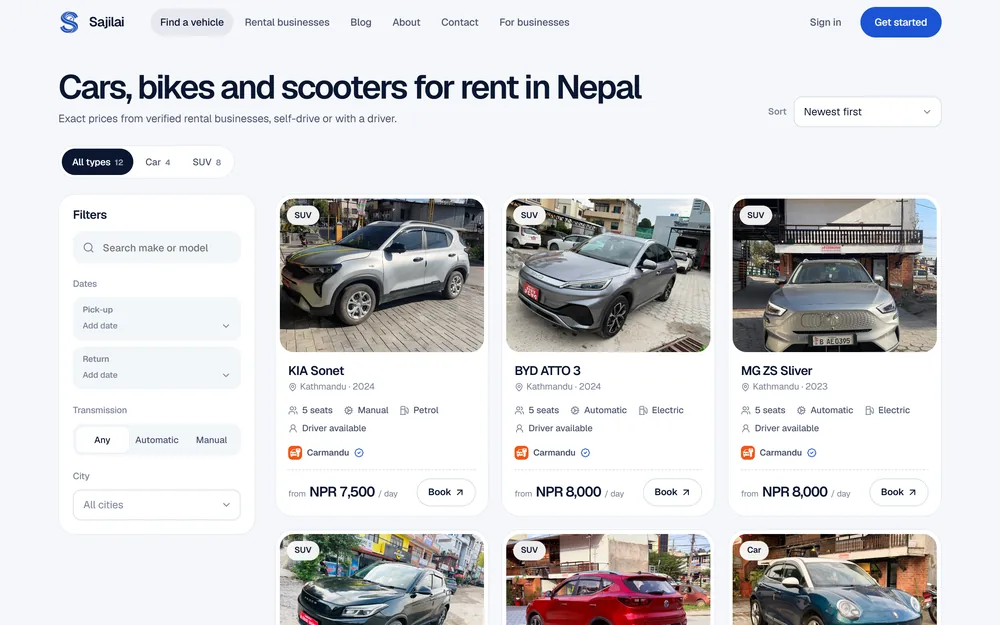
Case study: SajilaiA rental marketplace whose React pages are written into the HTML by the server, with the demo deployment set to noindex.
How Do You Add 301 Redirects on Launch Day?
Set up a permanent, server-side redirect from every changed URL to its new address, as listed in your URL map. Use 301 or 308, send each old URL straight to its final page in one hop, and update internal links to the new URLs. Then test every row of the map.
Google treats 301 and 308 as permanent, so the new URL becomes the one it shows. With 302, 303 and 307, the old URL can stay in the results. Google asks you to keep redirects “for as long as possible, generally at least 1 year”.
# Apache or LiteSpeed (.htaccess), as on most cPanel hosting
Redirect 301 /services/web-design https://www.example.com.np/web-design-nepal/

# Nginx
location = /services/web-design { return 301 https://www.example.com.np/web-design-nepal/; }

# Next.js (next.config.js): permanent: true sends a 308
async redirects() {
  return [{ source: '/services/web-design', destination: '/web-design-nepal/', permanent: true }]
}
On WordPress, a redirect plugin or the redirect manager in your SEO plugin does the same job; my WordPress SEO guide covers the plugin setup. Whichever tool you use, check three things:
- One hop: an old URL that already redirected once must now point straight to the final page, with no chain.
- Every variant:
httpandhttps, with and withoutwww, with and without the trailing slash. - Real status codes: paste the old URL list into a crawler in list mode and confirm each one returns 301 and ends on a 200.
Planning a Redesign? Keep What Already Ranks.Send me your current site. I’ll tell you what is at risk, build the URL map and redirects, and watch Search Console after launch. Redesigns are quoted per site.
Ask about a redesignCan You Do 301 Redirects on GitHub Pages or Other Static Hosts?
Not per URL on GitHub Pages. It is a static host, so there is no server setting for a 301 on a single page. You have three options: keep the same URLs, which is best; publish a small HTML page at each old address with an instant meta refresh and a canonical tag; or put a service such as Cloudflare in front to send real 301s.
Option 1: Keep the Same URLs
If every old URL still exists on the new site, there is nothing to redirect. This is what I did for this site, and it is the only option with no SEO cost.
Option 2: Meta Refresh Plus Canonical
Google interprets an instant meta refresh, with a 0-second delay, as a permanent redirect, and a delayed one as temporary. Add a canonical tag to the new URL so both signals agree, and a plain link for people.
<!DOCTYPE html>
<html lang="en">
<head>
  <meta charset="utf-8">
  <title>Page moved</title>
  <meta http-equiv="refresh" content="0; url=https://www.example.com.np/new-page/">
  <link rel="canonical" href="https://www.example.com.np/new-page/">
</head>
<body>
  <p>This page has moved to <a href="https://www.example.com.np/new-page/">its new address</a>.</p>
</body>
</html>
On Jekyll, the jekyll-redirect-from plugin, which GitHub Pages supports, generates these pages. Google says to use a JavaScript redirect only when neither of the other kinds is possible, so treat a script as a fallback.
Option 3: Real 301 Redirects from a Proxy or Another Host
If your domain’s DNS is proxied through Cloudflare, its Bulk Redirects send real 301s by default, on every plan including the free one. Cloudflare Pages also reads a _redirects file, but its default code is 302, so write 301 at the end of each line.
What Else Must Work on Launch Day?
On launch day, remove every staging block, then check canonicals, the XML sitemap, robots.txt, structured data, Core Web Vitals and the analytics and Search Console tags on the live site. Check them in this order within the first hour.
- Staging rules gone: no noindex in any template, no
Disallow: /in robots.txt. - Redirects live: rerun the old URL list and fix any row that does not end on a 200.
- Canonicals: each page points to its own new URL on the live host, never to staging.
- XML sitemap: only new 200 URLs, submitted in Search Console and Bing Webmaster Tools.
- robots.txt: allows CSS, JavaScript and public sections, and names the sitemap.
- Structured data: key templates pass the Rich Results Test.
- hreflang: Nepali and English annotations use the new URLs.
- Core Web Vitals: top pages pass LCP 2.5 s, INP 200 ms and CLS 0.1 on mobile.
- Tracking: analytics and conversion events fire, and Search Console verification still works.
Keep a copy of the old sitemap for retesting redirects; Google uses the new one once the move starts. Larger sites need several sitemaps: my wedding invitation product Nimtto has five, and Jhino generates its robots.txt and sitemap itself, so they never fall out of date after a release.
What Should You Monitor After a Redesign Launch?
For four to eight weeks after launch, check the Page indexing, Sitemaps and Performance reports in Search Console, inspect your top pages one by one, and compare clicks with your benchmark for the same number of days. Expect some movement at first. Act on errors at once and on trends after a few weeks.
Google says to expect temporary fluctuation in rankings during a move, and that a small to medium-sized site can take a few weeks for most pages to move. A drop that is still growing in week four needs action.
| When | What to check | Where |
|---|---|---|
| Launch day | Redirects, noindex, canonicals, sitemap submitted, tracking firing | Crawler, view source, Search Console |
| Week 1, daily | New 404s, server errors, top 20 pages inspected and indexed | Page indexing report, URL Inspection |
| Weeks 2 to 4, twice a week | Clicks and impressions against the benchmark, sitemap pages indexed | Performance report with date comparison |
| Weeks 5 to 8, weekly | Keyword positions, conversions from organic search, Core Web Vitals | Rank tracker, analytics, Core Web Vitals report |
If a page drops and stays down, compare it with its old version first. In my experience the cause is usually something the redesign removed: text, a menu link or a rewritten title.
When Do You Need the Change of Address Tool?
Use Google’s Change of Address tool only when you move from one domain or subdomain to another, such as example.com to example.com.np. It is not for a redesign on the same domain, a move from HTTP to HTTPS or new paths within one site. Those need redirects and an updated sitemap.
Google asks for a 301 from the old home page to the new one, plus the other canonical pages, ownership of both properties in Search Console, and every variant of the old domain verified. The tool’s effects continue for 180 days, so keep the old domain registered and redirecting long after.
Common Website Redesign SEO Mistakes
Each of these is easy to prevent and slow to recover from, so check your plan against the list before launch day:
- Launching with the staging noindex: the whole site starts dropping out of Google within days.
- Redirecting everything to the home page: visitors land somewhere unrelated, and Google may treat it as a soft 404.
- Using 302 by default: some hosts default to temporary redirects; write 301 on purpose.
- Cutting text for looks: ranking pages lose the answers that made them rank.
- Launching before a festival: a launch the week before Dashain leaves no time to fix problems.
Get an audit before the design startsAn SEO audit of the current site records what ranks and what links in, so the new site keeps both. Mine starts from NPR 15,000 and takes about a week.
How I Relaunched This Site Without Changing a URL
I relaunched ujjwalrupakheti.com.np in a new design on 3 November 2026. All 37 of the old pages kept their exact URLs, so no page needed a redirect. One old duplicate under /blogs/ now redirects with an instant meta refresh and a canonical tag, and the sitemap grew from the old pages to 67 URLs.
The site is static HTML on GitHub Pages, so I kept every existing path. The preview ran on my own computer, not a public address, and still gave every page a noindex, nofollow tag as a second guard; the launch script swaps it for the indexable tag. The duplicate, an old copy of my SEO tools guide, now holds a 0-second meta refresh, a canonical to the guide’s real address, a script fallback and a plain link.
No ranking claims yetThe new site went live the day this guide was published, so it is too early to report a result. I will add real Search Console numbers after eight weeks.
The Full Website Redesign SEO Checklist
Copy this table into a sheet and mark each row done, failed or not applicable. The order matters: the rows before launch decide whether the launch-day rows are easy or impossible.
| Phase | Check | Where to check |
|---|---|---|
| Before | Export Search Console pages and queries, 3 and 16 months | Performance report |
| Before | Record indexed page count and exclusion reasons | Page indexing report |
| Before | Export top linked pages | Links report |
| Before | Save organic landing pages with conversions | Analytics |
| Before | Record mobile Core Web Vitals for top pages | PageSpeed Insights |
| Before | Save positions for 20 to 50 money keywords | Rank tracker |
| Before | Crawl every URL, including files and images | Crawler, sitemap |
| Before | Map every old URL to a new URL, 410 or keep | URL map sheet |
| Before | Keep URLs unchanged wherever possible | URL map sheet |
| Before | Compare titles, text and links on the top 20 pages | Old and new page side by side |
| Before | Carry over structured data and image alt text | Rich Results Test, crawler |
| Before | Main content in the server HTML on mobile | URL Inspection, view source |
| Before | Staging behind a password or IP rule, plus noindex | Private browser window |
| Before | Redirects written and tested on staging | Crawler in list mode |
| Launch day | noindex and Disallow: / removed from live | View source, robots.txt |
| Launch day | Every old URL returns 301 and ends on a 200 | Crawler in list mode |
| Launch day | No redirect chains; internal links point to final URLs | Crawler |
| Launch day | Self-referencing canonicals on the live host | Crawler, URL Inspection |
| Launch day | New XML sitemap submitted | Search Console, Bing Webmaster Tools |
| Launch day | robots.txt allows public sections, CSS and JS | robots.txt report |
| Launch day | Structured data valid on key templates | Rich Results Test |
| Launch day | hreflang updated to new URLs | Crawler |
| Launch day | LCP, INP and CLS pass on mobile | PageSpeed Insights |
| Launch day | Analytics and conversion events firing | Analytics real-time view |
| After | New 404s and server errors fixed daily in week 1 | Page indexing report |
| After | Top 20 pages inspected and indexed | URL Inspection |
| After | Clicks compared with the benchmark, same days | Performance report |
| After | Change of Address submitted, domain moves only | Search Console settings |
| After | Pages that dropped compared with their old version | Benchmark files |
| After | Redirects kept for at least a year | Server or host settings |
If you would rather hand the job over, I handle website redesign in Nepal from the URL map to the eight-week check, for clients in Itahari, Kathmandu and abroad. Every starting price is on my services page, and my SEO cost guide explains SEO budgets in Nepal.

About the author
Ujjwal Rupakheti
I am a full-stack web developer and SEO specialist based in Itahari, Koshi Province, Nepal. I have worked in web development and SEO since 2022 and have published more than 200 SEO-optimised articles across five-plus domains. Since June 2026 I have been a full-stack web developer at Ektukra Digital Agency, after a year there on SEO content strategy and QA testing.